Make It Pumpkin: A Thanksgiving Font with Built-In Color
When you are building a seasonal campaign, the typography often needs to do the heavy lifting for the atmosphere. Make It Pumpkin is a specialized creative font designed to capture the whimsy and warmth of Thanksgiving without requiring hours of manual color work in Adobe Illustrator or Affinity Designer. As a premium font utilizing OpenType full-color (SVG) technology, it offers a distinct aesthetic that standard black-and-white typefaces simply cannot match right out of the box.
Understanding the Whimsical Aesthetic
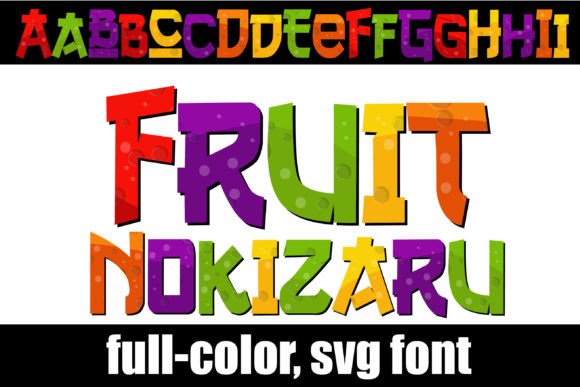
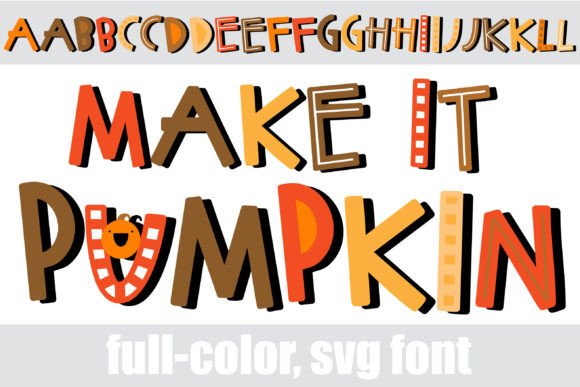
At its core, Make It Pumpkin is a sans serif font characterized by rounded edges and a playful bounce. It avoids the rigid structure of modern geometric typefaces, opting instead for a hand-lettered feel that feels personal and approachable. The defining feature, however, is the integrated color palette. The letterforms are pre-filled with a classic Thanksgiving spectrum—think burnt oranges, deep cranberry reds, golden yellows, and earthy browns. This makes it an ideal display font for headlines where you need to instantly evoke the feeling of autumn.
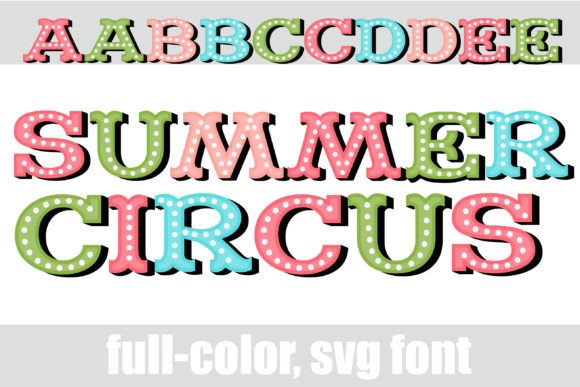
Because this is an SVG (Scalable Vector Graphics) font, the colors are embedded directly into the font file. This means you do not need to expand the text to shapes or apply complex clipping masks to achieve a multi-tonal look. You simply type, and the gradient and color data appear exactly as designed. For designers who value efficiency, this feature is a significant time-saver, particularly when producing high-volume content like social media graphics or party invitations.
Technical Compatibility and Installation
It is important to note that Make It Pumpkin is an OpenType SVG font. While it installs just like any standard .otf font via FontBook on Mac or the Control Panel on Windows, not all software supports the vector color data. Programs like Adobe Photoshop, Illustrator, Silhouette Studio, Quark, and Inkscape generally handle these files well, allowing you to see the colors as you type.
However, if you open this font in older software or text editors that do not support SVG technology, the font will default to rendering as a solid black outline. Even in compatible design software, the font preview window often displays the text in black. Do not be alarmed by this; once you click onto the canvas and begin typing, the full-color palette should render correctly. This technical nuance is a standard part of working with modern typography assets.
Strategic Applications for Branding and Marketing
While Make It Pumpkin is undeniably seasonal, its utility in design extends beyond simple Thanksgiving cards. For small business owners and marketers, this creative font can serve as a strategic tool for limited-time offers (LTOs) and seasonal rebranding.
Packaging and Product Design
If you are a crafter or food entrepreneur, packaging is your silent salesperson. Using Make It Pumpkin on packaging design for harvest-themed goods—such as jams, baked goods, or candles—instantly communicates the product's flavor profile or scent. The whimsical style suggests a homemade, artisanal quality, which can influence brand perception by making the product feel more accessible and less corporate. Paired with a clean serif font for the ingredient lists, it creates a balanced visual hierarchy that guides the customer’s eye.
Digital Marketing and Social Media
In the fast-paced world of web design and social media, stopping the scroll is paramount. The built-in color of Make It Pumpkin adds a layer of visual complexity that static text lacks. It works exceptionally well for Instagram Stories, Pinterest pins, and Facebook banners promoting fall sales or harvest festivals. The font’s personality helps in establishing a consistent brand identity during the Q4 holiday rush, ensuring your seasonal campaigns feel cohesive and professionally designed.
Design Principles: Pairing and Hierarchy
Because Make It Pumpkin is a highly stylized display font, using it for body copy is not recommended. The playful shapes and colors can become overwhelming in long paragraphs, hurting readability. Instead, treat this typeface as a headline specialist.
Font Pairing Strategies
The success of your design often relies on font pairing. To let Make It Pumpkin shine, you need a supporting cast that recedes into the background. Consider pairing it with a sturdy, neutral sans serif font like Montserrat or Open Sans for subheadings. If you want to lean into a more traditional, editorial aesthetic, a classic serif font like Garamond or Lora provides a sophisticated contrast to the font's whimsical nature.
Avoid pairing it with other script fonts or handwritten fonts. Two competing decorative styles will create visual noise, making the text difficult to parse and diluting the impact of the message.
Color and Alternates
The font includes an alternate case with additional color variations. This is particularly useful if you are designing a multi-page document or a complex layout where you need visual variety without changing the typeface. You can access these glyphs through your system’s character map or via the glyph panel in compatible design software. This feature allows you to maintain brand consistency while introducing subtle shifts in color to differentiate sections or categories.
Practical Considerations for Commercial Use
Before integrating Make It Pumpkin into your next project, a few practical checks are necessary. First, review the licensing. Most premium fonts require a specific license for commercial use, especially if you are creating physical products for sale or digital merchandise. Ensure your license covers your intended use case.
Second, consider your medium. Because this is a vector-based font, it scales beautifully for large-format printing, such as posters or signage. The edges will remain crisp and the colors vibrant regardless of size. However, if you are working on editorial design for a print magazine, be mindful of your printing process; full-color fonts can consume more ink than standard black text, and the colors may shift slightly depending on the CMYK conversion of your printer.
Ultimately, Make It Pumpkin is more than just a seasonal novelty. It is a functional design asset that streamlines the creation of festive, engaging content. By understanding its technical capabilities and stylistic strengths, you can use it to elevate your seasonal marketing and connect with your audience through thoughtful, colorful design.