Battle-Dad: A Full-Color Font for Bold Creators
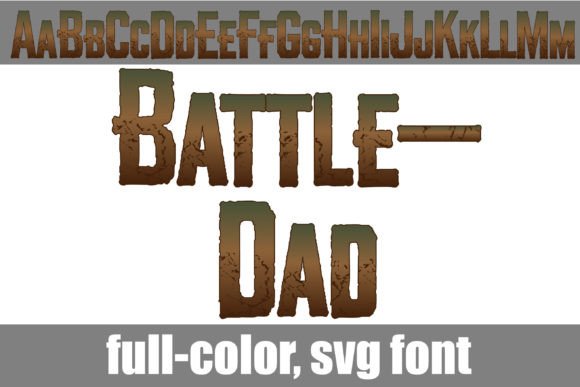
If you’ve ever felt that standard black-and-white typography lacks the punch needed for your high-energy projects, it’s time to look at Battle-dad. This is not just another typeface; it is a full-color display font designed to make an immediate impact. Featuring a distinct battle-style aesthetic, this font utilizes a rugged brown and green color palette that feels grounded, tactical, and organic. It is the kind of design asset that bridges the gap between vintage military posters and modern gritty graphics, offering a unique texture that standard vector fonts simply cannot replicate.
Understanding the SVG Advantage
What sets Battle-dad apart from your standard collection of serif or sans-serif fonts is the technology behind it. It is an OpenType full-color font, often referred to as an SVG font. In the past, if you wanted a font to have multiple colors or a textured finish, you had to manually layer different shapes in Adobe Illustrator or Silhouette Studio. With Battle-dad, the color and texture are embedded directly into the font file. When you type a letter, you aren't just getting a vector outline; you are getting a rasterized, high-fidelity image that retains the subtle nuances of the original design.
This means you get the "grunge" look, the subtle shading of the green and brown palette, and the depth of the font right out of the box. For designers, this is a massive time-saver. It streamlines the workflow for creating social media graphics, merchandise, and marketing materials where a distressed, battle-worn look is required. However, it is important to note that because these are high-resolution glyphs, the file size is larger than a standard font. Additionally, while the font is incredibly versatile, it is specifically engineered for display purposes. Think titles, headers, and logos rather than body copy for long-form articles.
Compatibility and Installation Realities
Before you integrate Battle-dad into your next project, you need to understand the technical requirements to ensure a smooth creative process. Because this is a specialized font type, it behaves slightly differently than standard files. The installation process remains familiar—you can install the .otf file via FontBook on a Mac or your preferred font manager/Control Panel on Windows. However, the rendering depends heavily on your software.
Programs like Adobe Photoshop, Illustrator, Quark, Inkscape, and Silhouette Studio fully support full-color SVG fonts. When you select the font in these environments, you may notice it appears black in the preview window or font selection dropdown. Do not panic; this is standard behavior. You will see the true, vibrant green and brown colors only once you begin typing on the document canvas. If you use a program that does not support OpenType color features, the font will default to a solid black silhouette. This ensures the font remains usable even on older systems, though you lose the signature color palette.
Practical Applications: From Branding to Packaging
The appeal of Battle-dad lies in its personality. It commands attention. For entrepreneurs and small business owners, this font is a powerful tool for logo design and brand identity, particularly if your brand voice is rugged, outdoorsy, or action-oriented. Imagine a craft brewery label, a landscaping company logo, or a fitness apparel brand. The green and brown palette suggests nature, durability, and resilience. Using this typeface instantly communicates a specific vibe to your audience without needing a lengthy explanation.
For content creators and marketers, Battle-dad excels in packaging design and editorial design. It is perfect for "hero" images on website banners or striking YouTube thumbnails. Because the font carries so much visual weight, you don't need to clutter your design with extra elements. A simple headline set in Battle-dad can anchor a poster or a flyer, leaving plenty of white space for the rest of your message.
Crafters using Silhouette Studio will find this particularly useful for creating decals, T-shirt transfers, and custom merchandise. Since the colors are baked into the file, you don't need to worry about vinyl layering to get that multi-color effect. It prints exactly as you see it on the screen, provided your printer supports high-quality color output.
Mastering Font Pairing and Hierarchy
When working with a distinct display font like Battle-dad, balance is key. Because the typeface has such a strong personality, pairing it with the wrong font can make a design feel chaotic. The best approach is to use contrast. Since Battle-dad is textured, bold, and stylistic, pair it with a clean, simple sans-serif font for your body text. Fonts like Helvetica, Open Sans, or a simple geometric sans-serif work well to ground the design and ensure readability.
Avoid pairing Battle-dad with other decorative, script fonts, or handwritten fonts. The visual noise would compete for the viewer's attention, making the message unreadable. Instead, let Battle-dad do the heavy lifting for the headlines. Use it to establish the visual hierarchy—the most important information that needs to be seen first. Then, use your secondary font to deliver the details.
Evaluating Fit and Commercial Use
Not every project calls for a battle-worn aesthetic. If you are designing a luxury spa menu or a delicate wedding invitation, this is likely not the right choice. However, if you are working on a gaming channel, a survivalist blog, or marketing materials for outdoor gear, it is an ideal fit. Always consider the readability of your specific message. While the font is legible at large sizes, very long words might become cumbersome due to the texture.
Furthermore, always review the licensing for your premium font assets. Most fonts like Battle-dad come with a license that covers both personal and commercial use, but it is your responsibility to verify the terms. Can you use it on physical products for sale? Can you use it in digital templates you sell? Checking these details upfront protects your business and respects the work of the type foundry.
Final Thoughts on Modern Typography
In the realm of modern typography, personality sells. Generic text often fades into the background, but a creative asset like Battle-dad forces the viewer to engage. It transforms a simple word into a graphic element. Whether you are designing a banner for a community event, creating a header for a blog post about tactical gear, or mocking up a label for a small-batch hot sauce, this font provides a level of depth that standard vectors lack.
By leveraging the full-color SVG technology, you are adopting a tool that is at the forefront of web design and digital art. It allows you to create complex, textured looks with the simplicity of typing a sentence. Just remember the technical requirements: use compatible software, pair it wisely, and ensure your audience is ready for the visual impact. When used correctly, Battle-dad is more than just a font; it’s a statement. It turns your text into a texture, your headlines into banners, and your designs into memorable visual experiences.